MyTMB Address Change
Mail Address Change
Follow the steps provided below to change your Mailing Address.
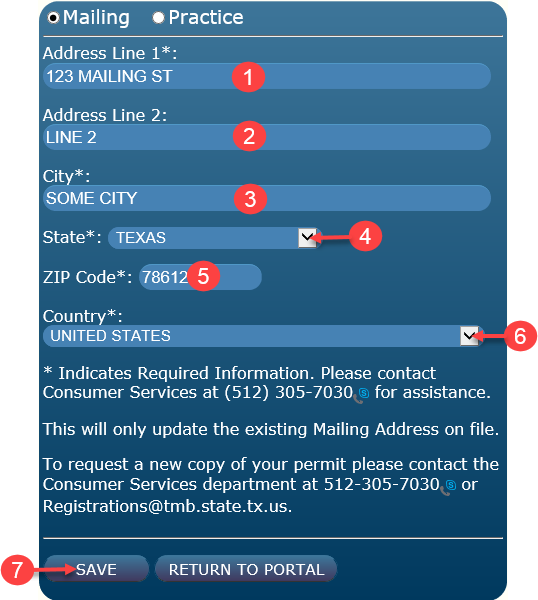
- Enter your physical address or P.O. Box number.
- Enter your Suite number if needed.
- Enter your City.
- Select your State from the drop down menu.
- Enter your Zip Code.
- Select your Country from the drop down menu.
- Select SAVE.
NOTE: If you select RETURN TO PORTAL without selecting SAVE,
your information will not be saved.
Practice Address Change
Follow the steps provided below to change your Practice Address.
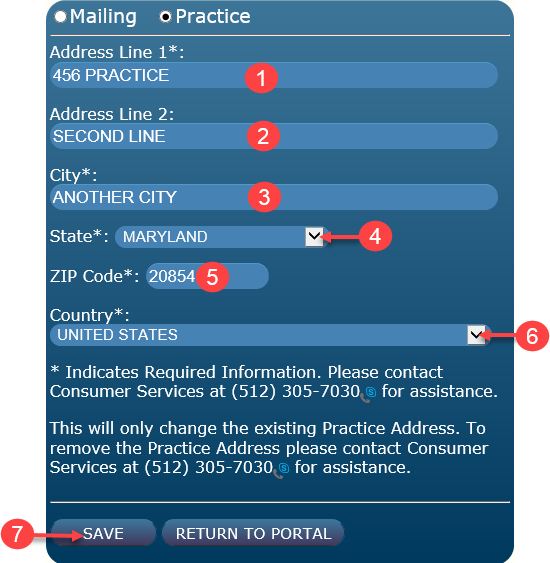
- Enter your physical address.
- Enter your Suite number if needed.
- Enter your City.
- Select your State from the drop down menu.
- Enter your Zip Code.
- Select your Country from the drop down menu.
- Select SAVE.
NOTE: If you select RETURN TO PORTAL without selecting SAVE,
your information will not be saved.
Phone Number Change
Follow the steps provided below to change your Mailing Address.
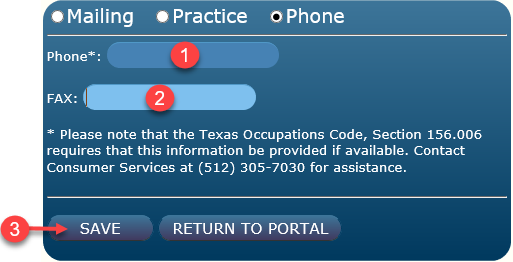
- Enter new phone number.
- Enter new fax number.
- Select SAVE.
If your changes are not saved, scroll back to the top of the active window and look for an error message similar to the one below.
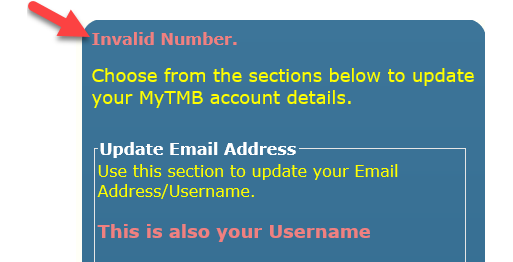
NOTE: MyTMB accepts international phone numbers. Enter + before the number.
You will have more than 10 digits. ( Example +12345678901 )
- File: Help Portal
- Last Updated: 5/10/2017