MyTMB Login Captcha
The first step in the LOGIN process is to enter the code displayed in the CAPTCHA image.
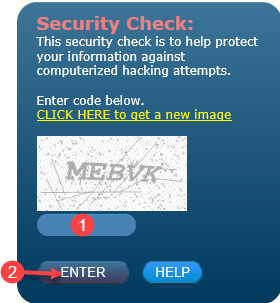
- Enter the CAPTCHA image or code displayed into the text box labeled 1. The text you enter is not case sensitive.
- Click ENTER.
NOTE: If you are unable to read the Security Check image, click on
“CLICK HERE to get a new image” to generate a new code. You may generate a new code as many times as you need.
- File: Help Portal
- Last Updated: 5/10/2017